Help:Sandbox mode
From Killing Floor wiki
The Sandbox Mode allows you to play Killing Floor in a completely different way of your choice. However, this disables perk progression.
How to set up Sandbox Mode
- Click on the Enable Sandbox checkbox.
- Click on the Sandbox TAB.
- Configure your desired settings.
- Click Play.
Screenshot gallery


Sandbox Settings
- Difficulty
- Sets how difficult you want the game to be. Beginner/Normal/Hard/Suicidal/Hell on Earth.
- Game Length
- Short (4 Waves) / Medium (7 Waves) / Long (10 Waves) / Custom (Disables perk progression but enables sandbox).
- Starting Cash
- How much cash you begin the game with (Max £500).
- Max Specimens
- How many enemies out of your maximum the game will allow on the map at any one time. Min: 6 (Great for map testing) Max: 600 (Causes EXTREME lag).
- Number of Waves
- This goes up to a maximum of 15 waves.
- Respawn Cash
- How much cash you are given after respawning on a new wave. Max: £500.
- Wave Downtime
- How much time you get to shop. Max: 100 Seconds.
- Wave Start Spawn Period
- How often new enemies are spawned. Min: 0.00. Max: 6.00.
- Use End Boss
- Enables/Disables the final boss fight.
Configuration pages
- Monster Classlist Config page
- This allows you to set up what specimens are allowed to play the game.
- Squad Config page
- This allows you to set up what Group (Squad) of specimens are spawned together.
- Wave Config page
- This allows you to set up which specimens are allowed on which waves. You can also set it to multiply the amount of specimens as if you were playing with more players.
Screenshot gallery
-
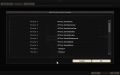 Monster Classlist Config
 -
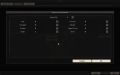 Squad Config
 -
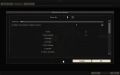 Wave Config


|
Language: | English • Русский |
|---|
Original wikitext recovered from the WikiTeam export in the archived KF-Wiki collection (export 2015-07-07, original revision 29976). Credit: the original KF-Wiki contributors; the linked export preserves the original authorship and revision history.


